> ## Documentation Index
> Fetch the complete documentation index at: https://handbook.getvera.ai/llms.txt
> Use this file to discover all available pages before exploring further.
# Common Lore
> Common lore are words, defintions and concepts which we are all familiar with. We use common lore to communicate clearly and efficiently
At Vera things move quickly and efficiently. Sometimes clarity, speed, and efficiency don't go hand in hand. One of our core principles is [Create common lore](https://handbook.getvera.ai/working-at-vera/how-we-work-at-vera#11-create-a-common-lore) - which invites everyone in the business to learn, apply, and contribute to a common set of definitions, words, and concepts that we all use.
We recognise that to layer complexity, we need a strong foundation, and good communication is at the core of it. That's why you won't catch us not using Common Lore, and we will help each other when we forget to use it!
# Web-app Pages
**Naming convention**: we generally refer to pages based on their URL extension, ununless we've found something easier for all of us to communicate.
* **/documents** is the **Documents Page**
* **/settings/company/general** is the **Company’s General Settings Page**.
* **/past-answers** is **Past Answers Page**
* **/questionnaires** is **Questionnaire Kanban Page**, because it has a Kanban view
* **/questionnaires/customerId/questionnaireId** is the **Questionnaire Page**
* **/questionnaires/questionnaireId/customerId/qaId is the Specific Question Page**
# Modals
**URL parameter naming convention**: object=action Modal
* (e.g., document=new, questionnaire=edit)
**Verbal/written reference**: When referring to these modals in conversation, documentation, or design specs, use the format Action + Object + Modal.
* (e.g. New Document Modal, Edit Questionnaire Modal)
**URL Structure**: Modal names should be appended to the end of the page URL in the form of query parameters.
* (e.g. [https://app.privasee.io/questionnaires?questionnaire=new](https://app.privasee.io/questionnaires?questionnaire=new) will open the “New Questionnaire” modal)
\--
**New Document Modal:** Modal for document creation.
***
# Questionnaires
**Original Questionnaire**: The original questionnaire uploaded by the user to the Questionnaires Page. Typically, a collection of questions/requirements to be answered or met is received from third parties.
Can fall into one of the following **formats**:
* **Original Questionnaire File**: Questionnaire Source in the form of a file.
* **Original Questionnaire URL**: Questionnaire Source in the form of an external link (e.g. link to an UpGuard portal).
**Questionnaire**: The platform’s internal representation of the original questionnaire file/link uploaded (i.e. The platform’s internal representation of the **Original Questionnaire**). It represents a set of questions/requirements received from third parties. It is the structured version of the user upload, which allows interaction within the platform.
Can fall into one of the following **formats**:
* **Questionnaire from File**: Questionnaire translated from **Questionnaire Source File.**
* **Questionnaire from URL**: Questionnaire translated from **Questionnaire Source URL.**
Can fall into one of the following **types**:
* **Security** \[Format] **Questionnaire**: Questionnaire structured as a list of questions requiring individual responses. Users are typically expected to provide answers directly within the **Questionnaire Source**.
* **RFP/RFI/RFQ** \[Format] **Questionnaire**: Questionnaire requesting a written document to be crafted from scratch, adhering to some guidelines stipulated in the source file.
**Specific Question components**:
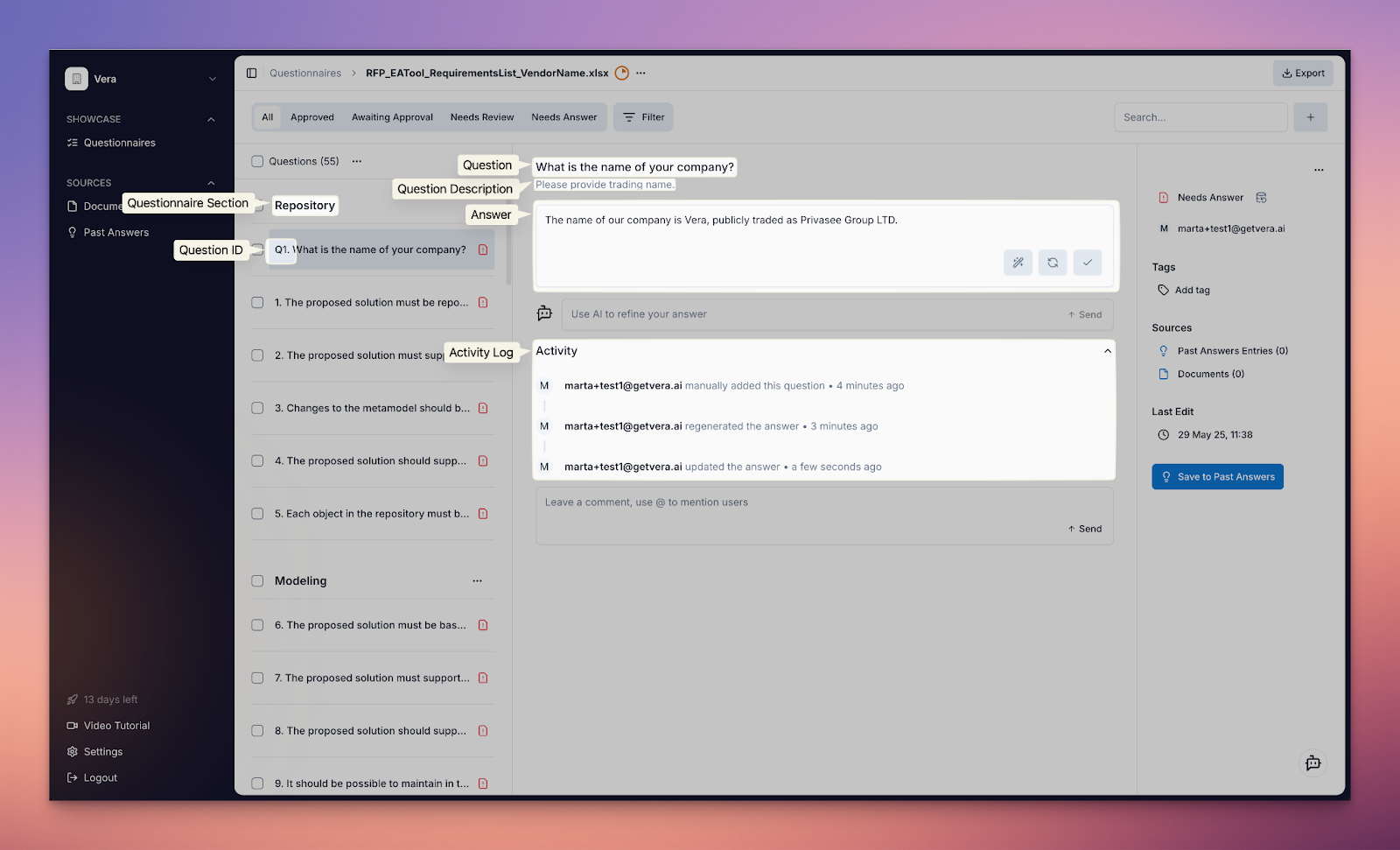 **Answer Types**: Each Specific Question in a Questionnaire has an Answer Type which defines the format in which the response should be provided.
Supported Answer Types include:
* **Text-area**: Open-ended, free-text input.
* **Single-select**: Selection of one option from a predefined list.
* **Multi-select**: Selection of multiple options from a predefined list.
* **Attachment**: File upload as response.
If a question requires multiple answer types, they should be listed together with a “+”.
* e.g. Text-area + Single-select + Attachment Answer Type
**Global prompts**: User-defined custom instructions provided at **Workspace** level, which apply universally to all answers generated by the **Questionnaire Answering Agent**. They are consistently applied when providing responses unless overridden by more specific instructions at Specific Question level.
* E.g. used for adjusting tone, structure.
**Verbosity**: Defines the length and level of detail in the responses generated by the **Questionnaire Answering Agent**. It is configured at the **Workspace** level and consistently applied when providing responses unless overridden by more specific instructions at Specific Question level.
**Tweaks:** Tweaks are additional prompts applied at Specific Question level, allowing users to fine-tune how the Questionnaire Answering Agent generates a specific response.
Can either be:
* **Custom Tweaks**: User-created prompts.
* **Default Tweaks**: Predefined by Vera (e.g., “Make shorter”, “Answer with Yes/No”). These are editable and can be removed or modified by users.
***
# General Concepts
**Bulk actions**: Operations that can be performed on multiple items or concepts simultaneously, rather than one at a time.
* e.g. Applying the same Tweak to multiple questions at once, changing the status of multiple answers in a single action, removing multiple documents from the AI scope at once.
***
# Sources
**Source**: Any piece of content available to the platform i.e. the foundational material from which AI Modules draw information to generate responses. It can be either a **Document** or a **Past Answer**, and is used when the distinction between the two is not relevant.
Can either be:
* **within AI Scope**: Actively available to the relevant AI Module for generating responses.
* **outside AI Scope**: Not available to AI Modules. These Sources exist in the platform but are excluded from the assistant’s context and will not influence outputs.
**Document**: Any information living in the **Documents Page**.
Can fall into one of the following **formats**:
* **File Document**: Document manually uploaded as a file (e.g., PDF, DOCX).
* **URL Document**: Document added as an external link.
* **Generated Document**: Document created within the platform.
* **Google Drive Document**: Document added directly from a user’s connected Google Drive account.
Can either be:
* **within AI Scope**: Actively available to the relevant AI Module for generating responses.
* **outside AI Scope**: Not available to AI Modules. These Documents exist in the platform but are excluded from the assistant’s context and will not influence outputs.
## Past Answers
**Past Answers**: Question and Answer pair stored in the platform on the **Past Answers Page**. These are responses that have been uploaded as part of a questionnaire and have been saved onto Past Answer, added manually to the **Past Answers Page**, or previously approved from a **Questionnaire**.
Can either be:
* **within AI Scope**: Actively available to the relevant AI Module for generating responses.
* **outside AI Scope**: Not available to AI Modules. These Past Answers exist in the platform but are excluded from the assistant’s context and will not influence outputs.
**Past Questionnaire**: Completed questionnaire in the form of a file. Typically a collection of questions/requirements received from third parties and respective answers.
***
# AI Modules
**Naming convention**:
* `[Location] + [Function] + Agent` for background or automated processes.
* `[Location] + [Function] + Assistant` for interactive or **user-facing** helpers.
***
## Agents
**Questionnaire Extractor Agent**: Responsible for generating the internal representation of the customer’s questionnaire upload on the **Questionnaires Page** by identifying and extracting individual questions from the source (i.e. transforming a **Questionnaire Source** into a **Questionnaire**).
**Questionnaire Answering Agent**: Responsible for
1. Picking out relevant **Sources** to provide a response.
2. Generating responses to the questions on the **Questionnaire** based on relevant **Sources**.
3. Classifying responses generated as one of the following statuses:
* **Needs Answer**: No relevant **Sources** found - unable to provide response.
* **Needs Review**: Some relevant **Sources** found - low confidence response.
* **Awaiting Approval**: Relevant **Sources** found - high confidence response.
* **Approved**: Exact semantic match found in **Sources**.
**Questionnaire Export Agent**: Responsible for converting our internal representation of the customer’s questionnaire upload on the **Questionnaires Page** into various exportable formats for downstream use or submission by the user. Export types include:
1. Questionnaire → CSV
2. Questionnaire → JSON
3. *(not yet implemented)* Questionnaire → Original Format: Re-population of the original **Questionnaire Source** file with answers.
4. *(not yet implemented)* Supporting Documentation: ZIP of all Attachments used in Questionnaire responses.
## Assistants
**Questionnaire Answering Assistant**: Allows users to adjust questionnaire responses by giving feedback using free-text prompts. This assistant operates within the context of a specific question.
Supported user requests:
* Generate responses without Sources
* Generate a response using specific Sources
* Format adjustments (e.g. make response longer, use British spelling)
* Change language
**Answer Types**: Each Specific Question in a Questionnaire has an Answer Type which defines the format in which the response should be provided.
Supported Answer Types include:
* **Text-area**: Open-ended, free-text input.
* **Single-select**: Selection of one option from a predefined list.
* **Multi-select**: Selection of multiple options from a predefined list.
* **Attachment**: File upload as response.
If a question requires multiple answer types, they should be listed together with a “+”.
* e.g. Text-area + Single-select + Attachment Answer Type
**Global prompts**: User-defined custom instructions provided at **Workspace** level, which apply universally to all answers generated by the **Questionnaire Answering Agent**. They are consistently applied when providing responses unless overridden by more specific instructions at Specific Question level.
* E.g. used for adjusting tone, structure.
**Verbosity**: Defines the length and level of detail in the responses generated by the **Questionnaire Answering Agent**. It is configured at the **Workspace** level and consistently applied when providing responses unless overridden by more specific instructions at Specific Question level.
**Tweaks:** Tweaks are additional prompts applied at Specific Question level, allowing users to fine-tune how the Questionnaire Answering Agent generates a specific response.
Can either be:
* **Custom Tweaks**: User-created prompts.
* **Default Tweaks**: Predefined by Vera (e.g., “Make shorter”, “Answer with Yes/No”). These are editable and can be removed or modified by users.
***
# General Concepts
**Bulk actions**: Operations that can be performed on multiple items or concepts simultaneously, rather than one at a time.
* e.g. Applying the same Tweak to multiple questions at once, changing the status of multiple answers in a single action, removing multiple documents from the AI scope at once.
***
# Sources
**Source**: Any piece of content available to the platform i.e. the foundational material from which AI Modules draw information to generate responses. It can be either a **Document** or a **Past Answer**, and is used when the distinction between the two is not relevant.
Can either be:
* **within AI Scope**: Actively available to the relevant AI Module for generating responses.
* **outside AI Scope**: Not available to AI Modules. These Sources exist in the platform but are excluded from the assistant’s context and will not influence outputs.
**Document**: Any information living in the **Documents Page**.
Can fall into one of the following **formats**:
* **File Document**: Document manually uploaded as a file (e.g., PDF, DOCX).
* **URL Document**: Document added as an external link.
* **Generated Document**: Document created within the platform.
* **Google Drive Document**: Document added directly from a user’s connected Google Drive account.
Can either be:
* **within AI Scope**: Actively available to the relevant AI Module for generating responses.
* **outside AI Scope**: Not available to AI Modules. These Documents exist in the platform but are excluded from the assistant’s context and will not influence outputs.
## Past Answers
**Past Answers**: Question and Answer pair stored in the platform on the **Past Answers Page**. These are responses that have been uploaded as part of a questionnaire and have been saved onto Past Answer, added manually to the **Past Answers Page**, or previously approved from a **Questionnaire**.
Can either be:
* **within AI Scope**: Actively available to the relevant AI Module for generating responses.
* **outside AI Scope**: Not available to AI Modules. These Past Answers exist in the platform but are excluded from the assistant’s context and will not influence outputs.
**Past Questionnaire**: Completed questionnaire in the form of a file. Typically a collection of questions/requirements received from third parties and respective answers.
***
# AI Modules
**Naming convention**:
* `[Location] + [Function] + Agent` for background or automated processes.
* `[Location] + [Function] + Assistant` for interactive or **user-facing** helpers.
***
## Agents
**Questionnaire Extractor Agent**: Responsible for generating the internal representation of the customer’s questionnaire upload on the **Questionnaires Page** by identifying and extracting individual questions from the source (i.e. transforming a **Questionnaire Source** into a **Questionnaire**).
**Questionnaire Answering Agent**: Responsible for
1. Picking out relevant **Sources** to provide a response.
2. Generating responses to the questions on the **Questionnaire** based on relevant **Sources**.
3. Classifying responses generated as one of the following statuses:
* **Needs Answer**: No relevant **Sources** found - unable to provide response.
* **Needs Review**: Some relevant **Sources** found - low confidence response.
* **Awaiting Approval**: Relevant **Sources** found - high confidence response.
* **Approved**: Exact semantic match found in **Sources**.
**Questionnaire Export Agent**: Responsible for converting our internal representation of the customer’s questionnaire upload on the **Questionnaires Page** into various exportable formats for downstream use or submission by the user. Export types include:
1. Questionnaire → CSV
2. Questionnaire → JSON
3. *(not yet implemented)* Questionnaire → Original Format: Re-population of the original **Questionnaire Source** file with answers.
4. *(not yet implemented)* Supporting Documentation: ZIP of all Attachments used in Questionnaire responses.
## Assistants
**Questionnaire Answering Assistant**: Allows users to adjust questionnaire responses by giving feedback using free-text prompts. This assistant operates within the context of a specific question.
Supported user requests:
* Generate responses without Sources
* Generate a response using specific Sources
* Format adjustments (e.g. make response longer, use British spelling)
* Change language
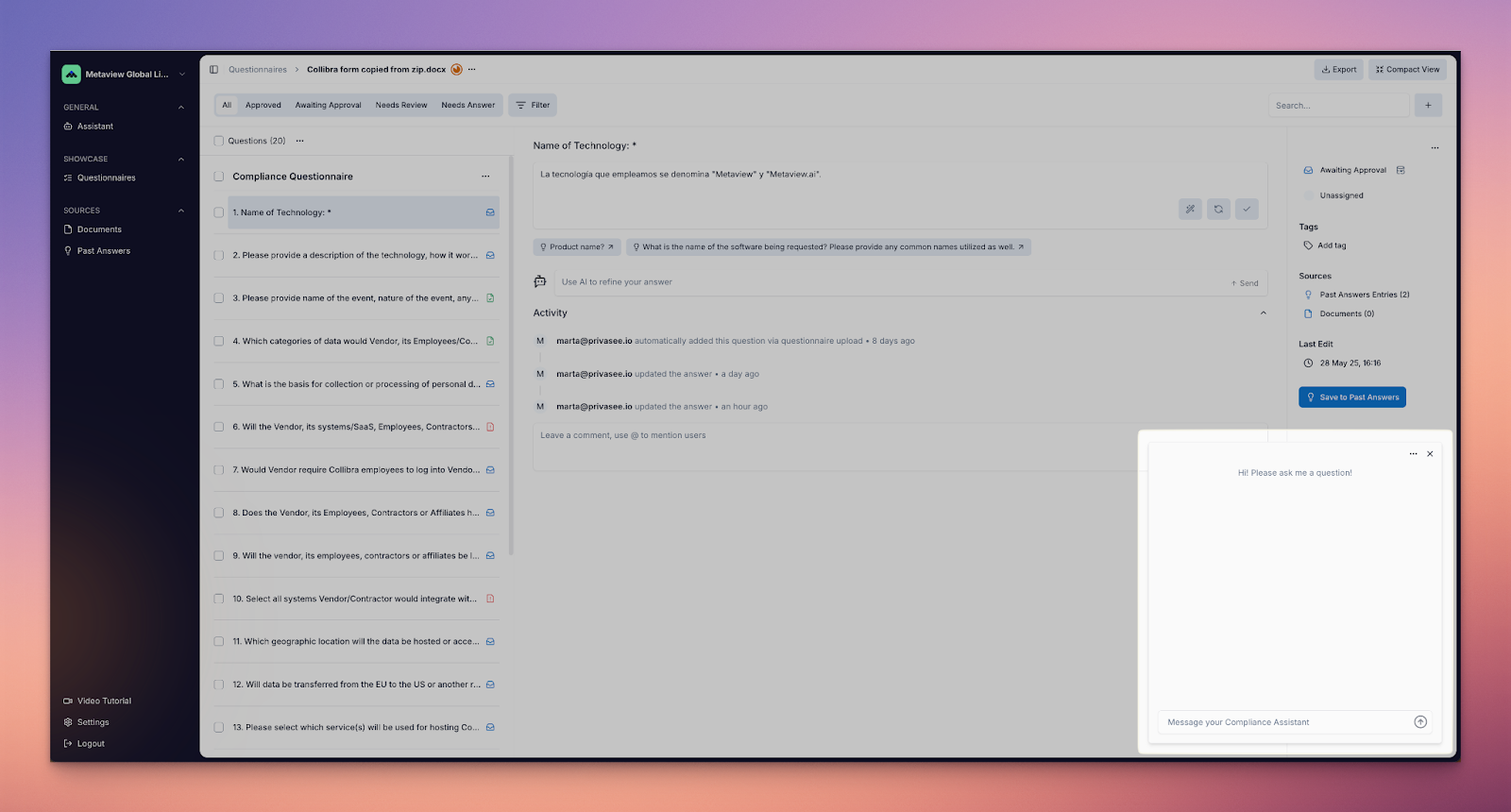
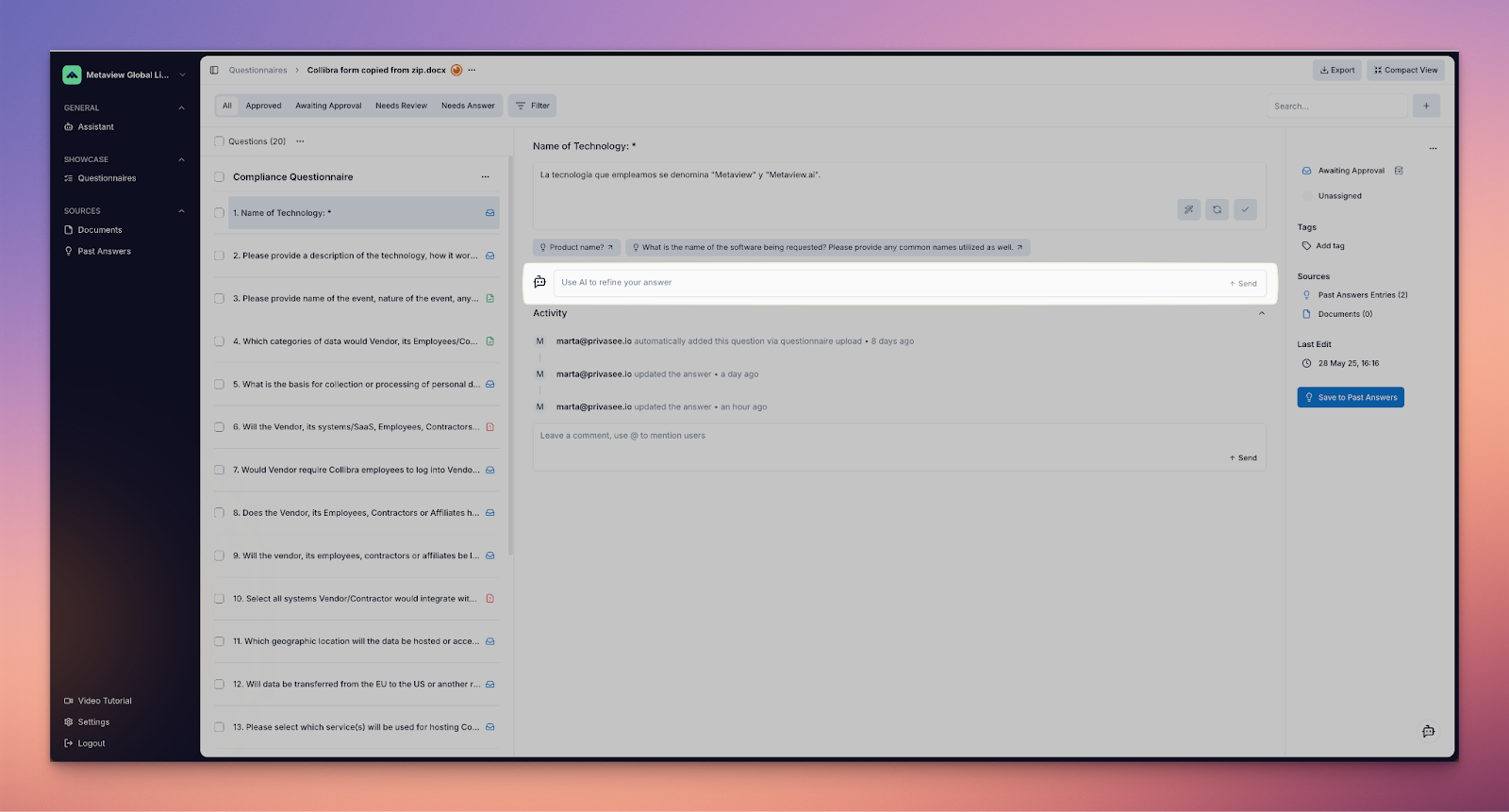 **Vera Assistant**: Acts as the user’s general-purpose assistant, focused on answering questions related to the business.
Supported user requests:
* Questions about the business
* General Privacy and Security questions
Unsupported user requests:
* Guidance on how to use or interact with the platform itself. It is not intended as a product support assistant.
**Vera Assistant**: Acts as the user’s general-purpose assistant, focused on answering questions related to the business.
Supported user requests:
* Questions about the business
* General Privacy and Security questions
Unsupported user requests:
* Guidance on how to use or interact with the platform itself. It is not intended as a product support assistant.
 **Slack Assistant**: Acts as the user’s general-purpose assistant within Slack, enabling interactive support for questionnaire workflows directly from the Slack interface.
***
## Additional Terms
**AI Scope**: Defines the information available to use by any of the **AI Modules**.
* **AI** can be replaced with any specific Agent or Assistant when relevant (e.g. **Questionnaire Answering Agent Scope**, or **Question & Answer Feedback Assistant Scope**)
**Slack Assistant**: Acts as the user’s general-purpose assistant within Slack, enabling interactive support for questionnaire workflows directly from the Slack interface.
***
## Additional Terms
**AI Scope**: Defines the information available to use by any of the **AI Modules**.
* **AI** can be replaced with any specific Agent or Assistant when relevant (e.g. **Questionnaire Answering Agent Scope**, or **Question & Answer Feedback Assistant Scope**)